%20-%20no%20white%20space%20-%20resized-1.png?width=4164&height=948&name=logo%201%20(bold)%20-%20no%20white%20space%20-%20resized-1.png)

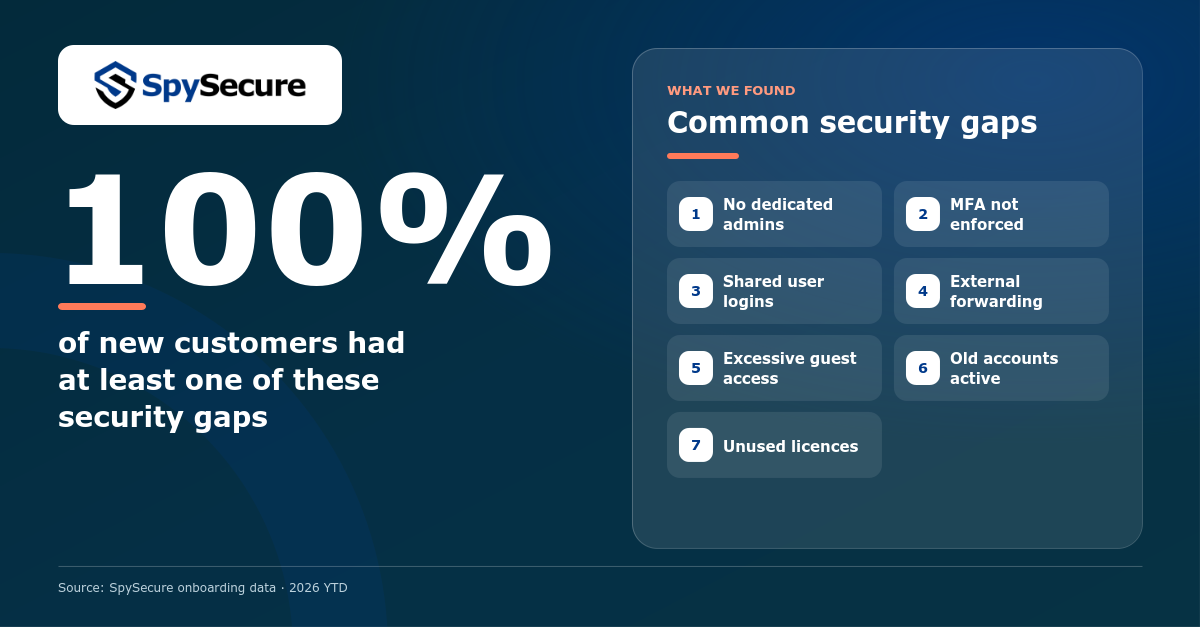
The security tools are usually already there. The problem is that nobody has checked whether the settings apply to every account or whether old access has actually been removed.
7 common security gaps
For each gap, we explain what can go wrong and what to ask your IT team or provider to check.
Daily user accounts also have administrator rights
An administrator uses the same account for e-mail, browsing and administrative work. If that account is compromised, the attacker can gain administrator access too.
MFA is set up, but not enforced
An employee can register an MFA method without being required to use it. Some users, administrators or exceptions may still be able to sign in with only a password.
Several people use the same login
Addresses such as info@, finance@ or support@ sometimes use one shared password. You can no longer see who did what, and MFA and offboarding become much harder.
Company e-mail is forwarded externally
Messages can be sent automatically to private or external inboxes. This takes company information outside your normal access, retention and monitoring controls. Old forwarding rules are often forgotten.
Guests still have access they no longer need
A customer, supplier or former contractor may still have access after a project ends. Often nobody knows which Teams, SharePoint sites or Google Drive folders they can still open.
Old accounts and access remain active
Former employees may have access beyond their Microsoft or Google account, including groups, applications, delegated mailboxes, shared files and other SaaS platforms. That access must also be removed.
You keep paying for unused licences
Accounts and licences often remain after an employee leaves or changes role. This costs money and is a clear sign that old accounts are not being cleaned up consistently.
Why nobody notices these gaps
Most gaps develop gradually. A temporary exception becomes permanent, an old account is forgotten or everybody assumes someone else is checking.
Small changes add up
New employees, teams, applications and exceptions are added. Old access is removed less consistently.
Nobody checks the complete setup
An IT provider may keep the platform running, while security settings and access reviews are not part of the agreement.
Management gets no proof
A setting is reported as “enabled”, but there is no current list of covered accounts, exceptions or follow-up.
Start with three simple questions
You do not need to understand every Microsoft or Google setting. Ask your IT team or provider:
Ask to see current account lists or reports, not just a verbal confirmation.
Want to know what this looks like in your environment?
Use the contact button at the bottom right or click below. We can help you review your Microsoft 365 or Google Workspace setup.
Talk to us →Technical references
- Microsoft: identity management and separate administrator accounts
- Microsoft: require MFA through Conditional Access
- Microsoft: shared mailboxes and delegated permissions
- Microsoft: control automatic external e-mail forwarding
- Microsoft: recurring access reviews
- Google: deploy and enforce 2-Step Verification
- Google: delegate access to e-mail without sharing passwords